
Description
Intelligent AI-Powered News Automation & Editorial Management Plugin for WordPress
Transform Your WordPress News Website into a Smart, AI-Powered Digital Newsroom.
Pothik AI Newsroom is an AI-powered WordPress plugin designed for online newspapers, digital news portals, journalists, publishers, and media organizations. It combines international news collection, multilingual AI translation, content editing, image management, editorial review, and automated publishing in one centralized platform.
Whether you operate a small online newspaper or manage a growing digital media organization, Pothik AI Newsroom helps streamline your editorial workflow, reduce repetitive tasks, and manage news production more efficiently.
Before purchasing and installing Pothik AI Newsroom, ensure that your website meets the following requirements.
| Requirement | Details |
| Platform | Self-hosted WordPress |
| Hosting | WordPress-compatible hosting |
| PHP | A supported PHP version compatible with the plugin |
| Database | WordPress-compatible MySQL or MariaDB |
| AI Service | Google Gemini API |
| Internet | Required for external news and AI services |
| Media Storage | Sufficient space for images and PhotoCards |
| Scheduled Tasks | Reliable WordPress Cron or server Cron recommended |
| Permissions | WordPress administrator access |
Compatibility notice: Verify your WordPress and PHP versions against the latest plugin release before installation. Compatibility with every theme, hosting environment, or third-party plugin is not guaranteed.
An active Google Gemini API key may be required for AI-powered features. API usage may involve additional charges depending on Google’s applicable pricing and usage limits.
- Installation Guide
Installing Pothik AI Newsroom is straightforward.
Step 1: Purchase and Download
After completing your purchase, download the Pothik AI Newsroom ZIP file from your order details or download section.
Save the downloaded ZIP file on your computer.
Do not extract the ZIP file unless specifically instructed.
Step 2: Log In to WordPress
Log in to your WordPress website using an administrator account.
Navigate to:
WordPress Dashboard → Plugins → Add New Plugin
Click Upload Plugin.
Step 3: Upload the Plugin
Click Choose File and select the downloaded Pothik AI Newsroom ZIP file.
Click Install Now.
Wait until WordPress finishes installing the plugin.
Once installation is complete, click Activate Plugin.
Step 4: Open the AI Newsroom
After activation, locate AI Newsroom in the WordPress administration menu.
Open the dashboard to access the newsroom management interface.
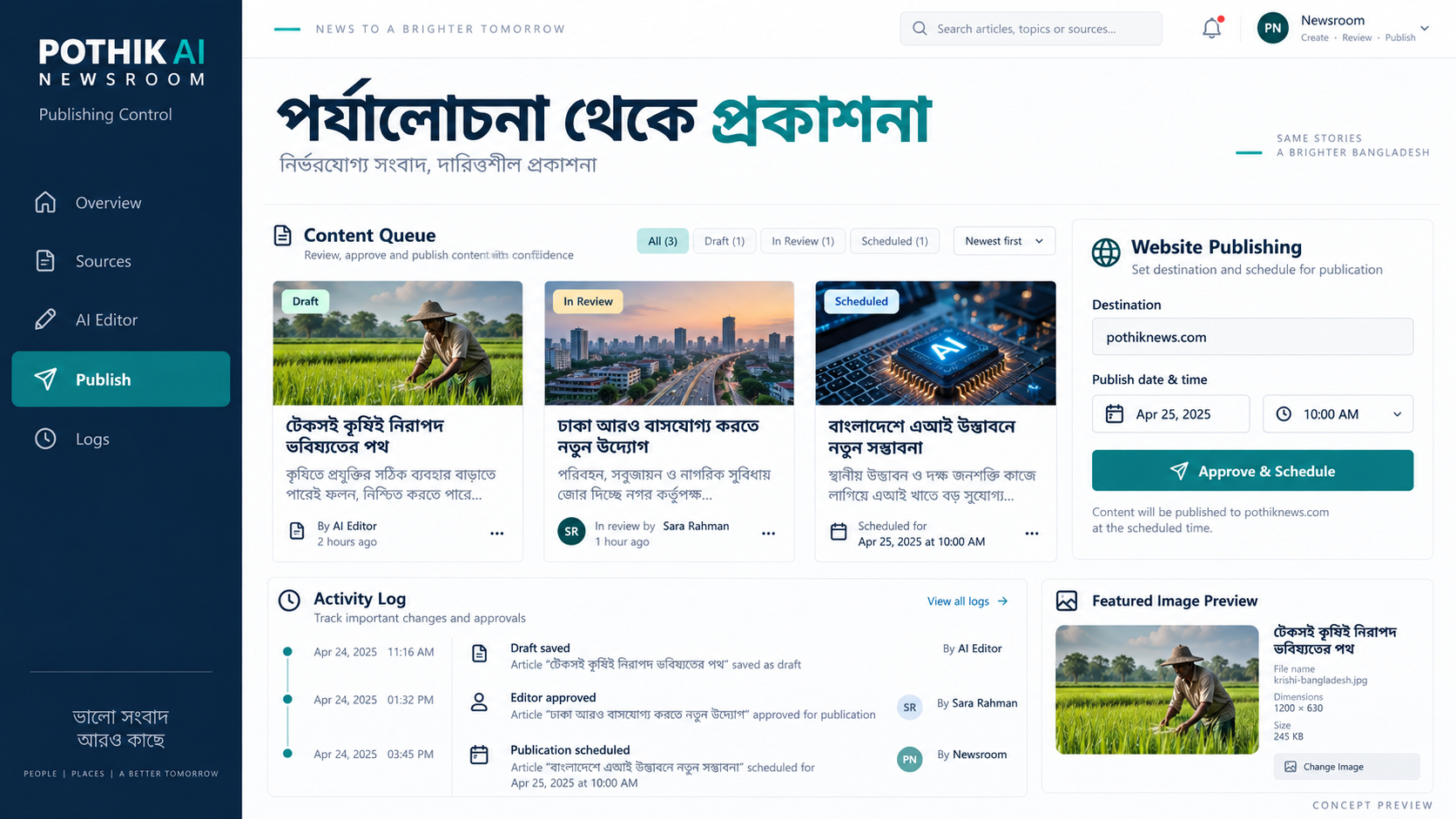
The dashboard provides access to news sources, the AI Editor, publishing tools, activity logs, and settings.
- Initial Configuration
Follow these steps to configure your newsroom.
Step 1: Configure Your AI Service
Navigate to:
AI Newsroom → Settings
Locate the Google Gemini API configuration section.
Enter your valid Gemini API key and save your settings.
If your installed version provides an API connection test, use it to verify connectivity.
Keep your API key confidential and never share it publicly.
Step 2: Configure News Sources
Navigate to:
AI Newsroom → News Sources
Review the available news feeds and activate the sources you want to use.
Depending on the installed version, you can configure sources for international news, technology, entertainment, sports, and other categories.
Use the available feed-testing functionality to verify that your selected sources are accessible.
Only use feeds and content in accordance with their publishers’ licensing conditions.
Step 3: Configure News Categories
Review your existing WordPress news categories.
Ensure that incoming articles are assigned to the appropriate categories.
Correct category mapping is particularly important for news themes that display specific categories on their homepages.
Step 4: Configure Featured Images
Open the image-related settings.
Enable the available featured image import and PhotoCard options according to your requirements.
You can also manually select images through the WordPress Media Library.
Ensure that you have permission to use any imported photographs.
Step 5: Configure Publishing
Choose the publishing workflow appropriate for your organization.
You may use automated publishing for eligible content or configure a workflow requiring editorial review.
For international politics, armed conflicts, breaking news, and other sensitive subjects, human editorial verification is strongly recommended.
Configure your publishing targets and scheduling preferences according to your hosting capacity and API limits.
- How to Create and Publish News
Once your newsroom is configured, follow this workflow.
- Collect News
The plugin retrieves available articles from your configured news sources.
- Generate AI Drafts
Selected articles can be processed through the configured AI service to create Bengali news drafts.
- Review and Edit
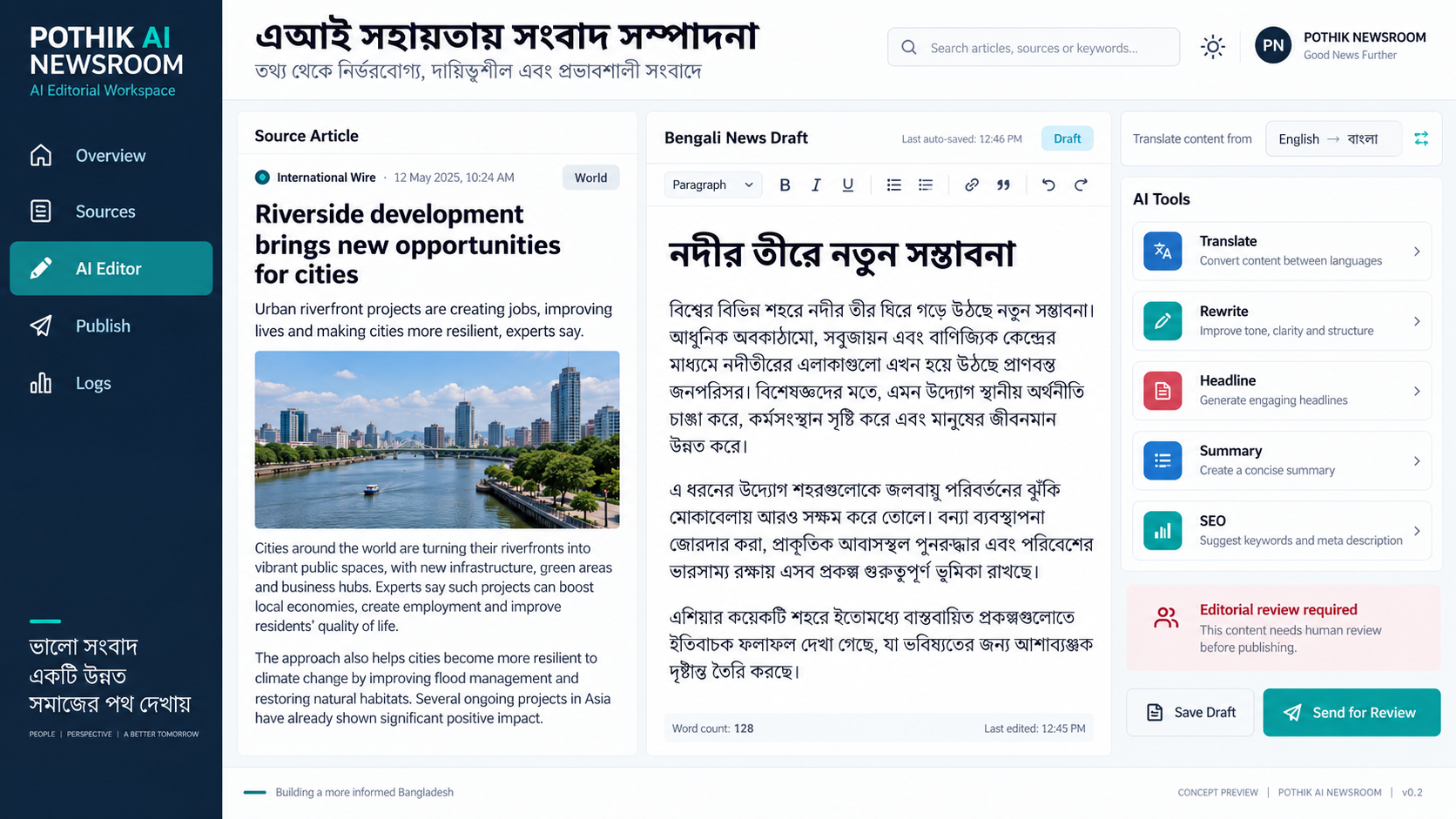
Open AI Newsroom → AI Editor.
Select an article and review its headline, content, original source, and featured image.
Use the available AI tools to generate editing suggestions when necessary.
- Verify the Article
Before publishing, verify the facts, source information, dates, quotations, and image permissions.
- Publish or Schedule
Save the article as a draft, submit it for editorial review, publish it, or schedule it for later publication, depending on your configured workflow.
- Verify Publication
Open the published article and confirm that its content, featured image, category, and publication date are correct.
If your theme uses category-specific homepage sections, ensure that the article is assigned to the relevant category.
- Important Information Before Purchase
Pothik AI Newsroom is an AI-assisted editorial and publishing solution. It is not a substitute for professional journalism, independent fact-checking, or human editorial judgment.
Please consider the following:
- AI-generated content may contain factual errors and requires appropriate review.
- The plugin does not grant redistribution rights to third-party news articles or photographs.
- External RSS feeds and AI services may become temporarily unavailable.
- Publishing performance depends on your hosting resources, API limits, and configured sources.
- Image availability and quality vary by source.
- Automated publishing does not guarantee a fixed number of articles per day.
Customers are responsible for complying with applicable copyright laws, publisher licensing terms, and relevant media regulations.

Reviews
There are no reviews yet.